
Hardware

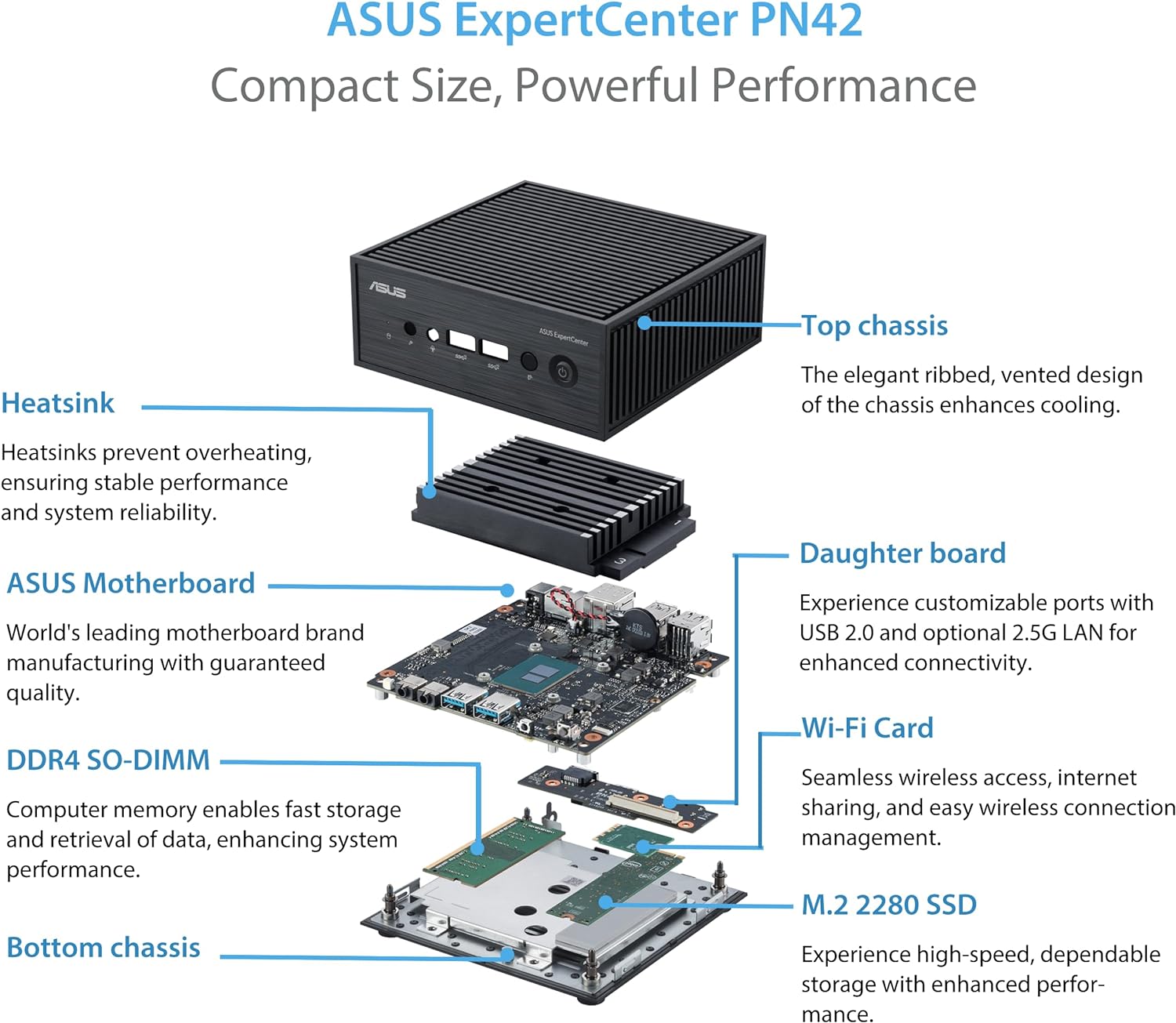
Buying
https://www.amazon.com/dp/B0C5Q7M23L
Specs
$ inxi -Fxxxz
System:
  Kernel: 6.5.0-14-generic x86_64 bits: 64 compiler: N/A Console: pty pts/1 DM: LightDM 1.30.0
    Distro: Linux Mint 21.2 Victoria base: Ubuntu 22.04 jammy

Machine:
  Type: Mini-pc System: ASUSTeK product: MINIPC PN42 v: N/A serial: <filter>
  Mobo: ASUSTeK model: PN42 serial: N/A UEFI: ASUSTeK v: 1.02.00 date: 02/15/2023

Battery:
  Device-1: hidpp_battery_0 model: Logitech Wireless Touch Keyboard K400 Plus serial: <filter>
    charge: 50% (should be ignored) rechargeable: yes status: N/A

CPU:
  Info: quad core model: Intel N100 bits: 64 type: MCP smt: <unsupported> arch: N/A rev: 0 cache:
    L1: 384 KiB L2: 2 MiB L3: 6 MiB
  Speed (MHz): avg: 702 high: 706 min/max: 700/3400 volts: 1.0 V ext-clock: 100 MHz cores:
    1: 706 2: 700 3: 702 4: 700 bogomips: 6451
  Flags: avx avx2 ht lm nx pae sse sse2 sse3 sse4_1 sse4_2 ssse3 vmx

Graphics:
  Device-1: Intel vendor: ASUSTeK driver: i915 v: kernel ports: active: HDMI-A-1
    empty: DP-1, DP-2, HDMI-A-2, HDMI-A-3 bus-ID: 00:02.0 chip-ID: 8086:46d1 class-ID: 0300
  Display: server: X.org v: 1.21.1.4 with: Xwayland v: 22.1.1 compositor: xfwm driver: X:
    loaded: modesetting unloaded: fbdev,vesa gpu: i915 tty: 190x48
  Monitor-1: HDMI-A-1 model: Samsung serial: <filter> res: 1920x1080 dpi: 43
    size: 1124x627mm (44.3x24.7") diag: 1287mm (50.7") modes: max: 1920x1080 min: 720x400
  Message: GL data unavailable in console for root.

Audio:
  Device-1: Intel vendor: ASUSTeK driver: snd_hda_intel v: kernel bus-ID: 00:1f.3
    chip-ID: 8086:54c8 class-ID: 0403
  Sound Server-1: ALSA v: k6.5.0-14-generic running: yes
  Sound Server-2: PulseAudio v: 15.99.1 running: yes
  Sound Server-3: PipeWire v: 0.3.48 running: yes

Network:
  Device-1: Intel driver: iwlwifi v: kernel port: N/A bus-ID: 00:14.3 chip-ID: 8086:54f0
    class-ID: 0280
    IF: wlo1 state: up mac: <filter>

  Device-2: Realtek RTL8125 2.5GbE vendor: ASUSTeK driver: r8169 v: kernel pcie: speed: 5 GT/s
    lanes: 1 port: 4000 bus-ID: 01:00.0 chip-ID: 10ec:8125 class-ID: 0200
    IF: enp1s0 state: down mac: <filter>

  Device-3: Realtek RTL8125 2.5GbE vendor: ASUSTeK driver: r8169 v: kernel pcie: speed: 5 GT/s
    lanes: 1 port: 3000 bus-ID: 03:00.0 chip-ID: 10ec:8125 class-ID: 0200
    IF: enp3s0 state: down mac: <filter>

Bluetooth:
  Device-1: Intel type: USB driver: btusb v: 0.8 bus-ID: 1-10:3 chip-ID: 8087:0033 class-ID: e001
  Report: hciconfig ID: hci0 rfk-id: 0 state: up address: <filter>

Drives:
  Local Storage: total: 238.47 GiB used: 25.87 GiB (10.8%)
  ID-1: /dev/nvme0n1 vendor: Patriot model: M.2 P300 256GB size: 238.47 GiB speed: 31.6 Gb/s
    lanes: 4 type: SSD serial: <filter> rev: V0808A0 temp: 49.9 C scheme: GPT

Partition:
  ID-1: / size: 233.18 GiB used: 25.86 GiB (11.1%) fs: ext4 dev: /dev/nvme0n1p2
  ID-2: /boot/efi size: 511 MiB used: 6.1 MiB (1.2%) fs: vfat dev: /dev/nvme0n1p1

Swap:
  ID-1: swap-1 type: file size: 2 GiB used: 0 KiB (0.0%) priority: -2 file: /swapfile

Sensors:
  System Temperatures: cpu: 50.0 C mobo: N/A
  Fan Speeds (RPM): N/A

Info:
  Processes: 253 Uptime: 9h 52m wakeups: 93 Memory: 15.36 GiB used: 1.46 GiB (9.5%) Init: systemd
  v: 249 runlevel: 5 Compilers: gcc: 11.4.0 alt: 11/12 Packages: 2196 apt: 2190 flatpak: 6
  Shell: Bash (su) v: 5.1.16 running-in: pty pts/1 (SSH) inxi: 3.3.13
Installation
The installation went smoothly with default settings, but there was no sound on the HDMI outputs. There was sound on the headphone jack, but no HDMI devices were listed in the sound settings.
This was indeed confirmed by:
$ aplay -l
**** List of PLAYBACK Hardware Devices ****
card 0: Intel [HDA Intel], device 0: ALC256 Analog [ALC256 Analog]
  Subdevices: 1/1
  Subdevice #0: subdevice #0

===> MISSING HDMI DEVICES! <===
$ pacmd list-cards
    index: 0
	name: <alsa_card.pci-0000_00_1f.3>
	driver: <module-alsa-card.c>
	owner module: 7
	properties:
		alsa.card = "0"
		alsa.card_name = "HDA Intel"
		alsa.long_card_name = "HDA Intel at 0x6001140000 irq 140"
		alsa.driver_name = "snd_hda_intel"
		device.bus_path = "pci-0000:00:1f.3"
		sysfs.path = "/devices/pci0000:00/0000:00:1f.3/sound/card0"
		device.bus = "pci"
		device.vendor.id = "8086"
		device.vendor.name = "Intel Corporation"
		device.product.id = "54c8"
		device.form_factor = "internal"
		device.string = "0"
		device.description = "Built-in Audio"
		module-udev-detect.discovered = "1"
		device.icon_name = "audio-card-pci"
	profiles:
		input:analog-stereo: Analog Stereo Input (priority 65, available: no)
		output:analog-stereo: Analog Stereo Output (priority 6500, available: no)
		output:analog-stereo+input:analog-stereo: Analog Stereo Duplex (priority 6565, available: no)
		off: Off (priority 0, available: unknown)

		===> MISSING HDMI PROFILES! <===

	active profile: <off>
	ports:
		analog-input-mic: Microphone (priority 8700, latency offset 0 usec, available: no)
			properties:
				device.icon_name = "audio-input-microphone"
		analog-output-lineout: Line Out (priority 9000, latency offset 0 usec, available: no)
			properties:

		analog-output-headphones: Headphones (priority 9900, latency offset 0 usec, available: no)
			properties:
				device.icon_name = "audio-headphones"

		===> MISSING HDMI PORTS! <===
Fixing HDMI Sound
Further investigation revealed that the video driver was not loaded:
$ sudo lshw -class display
*-display UNCLAIMED   <=== This means that no driver is loaded for this device!

     description: VGA compatible controller
     product: Intel Corporation
     vendor: Intel Corporation
     physical id: 2
     bus info: pci@0000:00:02.0
     version: 00
     width: 64 bits
     clock: 33MHz
     capabilities: pciexpress msi pm vga_controller bus_master cap_list
     configuration: latency=0
     resources: iomemory:600-5ff iomemory:400-3ff memory:6000000000-6000ffffff memory:4000000000-400fffffff ioport:5000(size=64) memory:c0000-dffff memory:4010000000-4016ffffff memory:4020000000-40ffffffff
Further confirmation:
$ lspci -nk -s 00:02.0
00:02.0 0300: 8086:46d1
  DeviceName: Onboard - Video
  Subsystem: 1043:8898

  ===> MISSING DRIVER INFO! <===
Intel Video Driver (i915)
Since this is an Intel CPU with integrated graphics, the Intel i915 video driver should be loaded, but it clearly isn’t.
Checking if the graphics card is supported: https://dgpu-docs.intel.com/devices/hardware-table.html
We can see that indeed it is:
| PCI ID | Name | Architecture | Codename |
| 46D1 | Intel® UHD Graphics | Xe (Gen12) | Alder Lake-N |
Attempts to insert the driver manually (modprobe -vvv i915) produced no errors, but also no results.
Kernel Version
Further research revealed that support for Alder Lake-N graphics was added in kernel version 5.18:
- https://www.phoronix.com/news/Linux-5.18-Pull-Intel-i915
- https://lore.kernel.org/dri-devel/YgKFLmCgpv4vQEa1@intel.com/
From the pull request for 5.18:
Driver Changes:
---------------

i915:
- ADL-N platform enabling (Tejas)
However, Linux Mint 21.2 comes with kernel version 5.15 installed by default, which is too old to support this graphics card.
Solution
Upgrade the kernel by going to Update Manager > View > Kernels and install at least version 5.19 or higher.
I tried both 5.19 and 6.5, and both worked fine.
After rebooting, the video driver was loaded and the HDMI sound devices were available.
$ lspci -nk -s 00:02.0
00:02.0 0300: 8086:46d1
	DeviceName: Onboard - Video
	Subsystem: 1043:8898
	Kernel driver in use: i915
	Kernel modules: i915
$ sudo lshw -class display
  *-display
       description: VGA compatible controller
       product: Intel Corporation
       vendor: Intel Corporation
       physical id: 2
       bus info: pci@0000:00:02.0
       logical name: /dev/fb0
       version: 00
       width: 64 bits
       clock: 33MHz
       capabilities: pciexpress msi pm vga_controller bus_master cap_list rom fb
       configuration: depth=32 driver=i915 latency=0 mode=1920x1080 resolution=1920,1080 visual=truecolor xres=1920 yres=1080
       resources: iomemory:600-5ff iomemory:400-3ff irq:133 memory:6000000000-6000ffffff memory:4000000000-400fffffff ioport:5000(size=64) memory:c0000-dffff memory:4010000000-4016ffffff memory:4020000000-40ffffffff
$ lsmod | grep i915
Module                  Size  Used by
i915                 4157440  6
drm_buddy              20480  1 i915
i2c_algo_bit           16384  1 i915
ttm                   110592  1 i915
drm_display_helper    241664  1 i915
cec                    94208  2 drm_display_helper,i915
drm_kms_helper        270336  2 drm_display_helper,i915
drm                   761856  9 drm_kms_helper,drm_display_helper,drm_buddy,i915,ttm
video                  73728  2 asus_wmi,i915
$ aplay -l
**** List of PLAYBACK Hardware Devices ****
card 0: PCH [HDA Intel PCH], device 0: ALC256 Analog [ALC256 Analog]
  Subdevices: 1/1
  Subdevice #0: subdevice #0
card 0: PCH [HDA Intel PCH], device 3: HDMI 0 [HDMI 0]
  Subdevices: 1/1
  Subdevice #0: subdevice #0
card 0: PCH [HDA Intel PCH], device 7: HDMI 1 [HDMI 1]
  Subdevices: 1/1
  Subdevice #0: subdevice #0
card 0: PCH [HDA Intel PCH], device 8: HDMI 2 [HDMI 2]
  Subdevices: 1/1
  Subdevice #0: subdevice #0
card 0: PCH [HDA Intel PCH], device 9: HDMI 3 [HDMI 3]
  Subdevices: 1/1
  Subdevice #0: subdevice #0
$ pacmd list-cards
1 card(s) available.
    index: 0
	name: <alsa_card.pci-0000_00_1f.3>
	driver: <module-alsa-card.c>
	owner module: 7
	properties:
		alsa.card = "0"
		alsa.card_name = "HDA Intel PCH"
		alsa.long_card_name = "HDA Intel PCH at 0x6001140000 irq 142"
		alsa.driver_name = "snd_hda_intel"
		device.bus_path = "pci-0000:00:1f.3"
		sysfs.path = "/devices/pci0000:00/0000:00:1f.3/sound/card0"
		device.bus = "pci"
		device.vendor.id = "8086"
		device.vendor.name = "Intel Corporation"
		device.product.id = "54c8"
		device.form_factor = "internal"
		device.string = "0"
		device.description = "Built-in Audio"
		module-udev-detect.discovered = "1"
		device.icon_name = "audio-card-pci"
	profiles:
		input:analog-stereo: Analog Stereo Input (priority 65, available: no)
		output:analog-stereo: Analog Stereo Output (priority 6500, available: no)
		output:analog-stereo+input:analog-stereo: Analog Stereo Duplex (priority 6565, available: no)
		output:hdmi-stereo: Digital Stereo (HDMI) Output (priority 5900, available: no)
		output:hdmi-stereo+input:analog-stereo: Digital Stereo (HDMI) Output + Analog Stereo Input (priority 5965, available: no)
		output:hdmi-stereo-extra1: Digital Stereo (HDMI 2) Output (priority 5700, available: no)
		output:hdmi-stereo-extra1+input:analog-stereo: Digital Stereo (HDMI 2) Output + Analog Stereo Input (priority 5765, available: no)
		output:hdmi-surround-extra1: Digital Surround 5.1 (HDMI 2) Output (priority 600, available: no)
		output:hdmi-surround-extra1+input:analog-stereo: Digital Surround 5.1 (HDMI 2) Output + Analog Stereo Input (priority 665, available: no)
		output:hdmi-surround71-extra1: Digital Surround 7.1 (HDMI 2) Output (priority 600, available: no)
		output:hdmi-surround71-extra1+input:analog-stereo: Digital Surround 7.1 (HDMI 2) Output + Analog Stereo Input (priority 665, available: no)
		output:hdmi-stereo-extra2: Digital Stereo (HDMI 3) Output (priority 5700, available: no)
		output:hdmi-stereo-extra2+input:analog-stereo: Digital Stereo (HDMI 3) Output + Analog Stereo Input (priority 5765, available: no)
		output:hdmi-surround-extra2: Digital Surround 5.1 (HDMI 3) Output (priority 600, available: no)
		output:hdmi-surround-extra2+input:analog-stereo: Digital Surround 5.1 (HDMI 3) Output + Analog Stereo Input (priority 665, available: no)
		output:hdmi-surround71-extra2: Digital Surround 7.1 (HDMI 3) Output (priority 600, available: no)
		output:hdmi-surround71-extra2+input:analog-stereo: Digital Surround 7.1 (HDMI 3) Output + Analog Stereo Input (priority 665, available: no)
		output:hdmi-stereo-extra3: Digital Stereo (HDMI 4) Output (priority 5700, available: no)
		output:hdmi-stereo-extra3+input:analog-stereo: Digital Stereo (HDMI 4) Output + Analog Stereo Input (priority 5765, available: no)
		output:hdmi-surround-extra3: Digital Surround 5.1 (HDMI 4) Output (priority 600, available: no)
		output:hdmi-surround-extra3+input:analog-stereo: Digital Surround 5.1 (HDMI 4) Output + Analog Stereo Input (priority 665, available: no)
		output:hdmi-surround71-extra3: Digital Surround 7.1 (HDMI 4) Output (priority 600, available: no)
		output:hdmi-surround71-extra3+input:analog-stereo: Digital Surround 7.1 (HDMI 4) Output + Analog Stereo Input (priority 665, available: no)
		off: Off (priority 0, available: unknown)
	active profile: <off>
	ports:
		analog-input-mic: Microphone (priority 8700, latency offset 0 usec, available: no)
			properties:
				device.icon_name = "audio-input-microphone"
		analog-output-lineout: Line Out (priority 9000, latency offset 0 usec, available: no)
			properties:

		analog-output-headphones: Headphones (priority 9900, latency offset 0 usec, available: no)
			properties:
				device.icon_name = "audio-headphones"
		hdmi-output-0: HDMI / DisplayPort (priority 5900, latency offset 0 usec, available: no)
			properties:
				device.icon_name = "video-display"
		hdmi-output-1: HDMI / DisplayPort 2 (priority 5800, latency offset 0 usec, available: no)
			properties:
				device.icon_name = "video-display"
		hdmi-output-2: HDMI / DisplayPort 3 (priority 5700, latency offset 0 usec, available: no)
			properties:
				device.icon_name = "video-display"
		hdmi-output-3: HDMI / DisplayPort 4 (priority 5600, latency offset 0 usec, available: no)
			properties:
				device.icon_name = "video-display"



 N1nja Hacks